之前在HN上看到了一个简单的应用程序,作者从网上抓取了一堆图片并使用嵌入,然后制作了一个简单的“查看类似图片”的应用程序。
本文将详细介绍如何使用向量嵌入、向量数据库和 CLIP(Contrastive Language-Image Pre-Training)模型,从零开始搭建一个功能强大的图片搜索引擎。我们将分步骤讲解每个组件的作用及其实现方法,最终实现一个能够基于图片内容进行搜索的系统。
在开始阅读本篇文章之前,如果你没有接触过嵌入,clip,向量数据库等,也没关系。文章内容已经尽我所能写的通俗易懂,老少咸宜。
读者如果感兴趣可以跳转老夫之前介绍嵌入的文章[嵌入:它是什么以及它为什么重要](https://juejin.cn/post/7325356387152707634)
前置输入 在开始阅读后面文章的内容之前,我们先简单介绍以下后面可能会出现的术语:
嵌入:嵌入将图像文本转换为数字表示,使我们能够找到相似的图片并有效地搜索我们的库。
向量数据库:向量数据库是一种存储和搜索编码项目的方法,使我们能够找到相似的项目。
Word2Vec:ord2Vec 是一种突破性的技术,可将单词转换为数字向量,使我们能够执行查找语义相似的语句,不再是单纯的分词。
OpenCLIP: CLIP 是 OpenAI 的模型,可将图像和文本编码为数字向量。OpenCLIP是CLIP的开源实现。许任何人使用和构建这种强大的图像和文本编码技术,而无需特殊访问或权限。
Qdrant: Qdrant 是一个高效的库,用于管理和搜索大量图像向量。
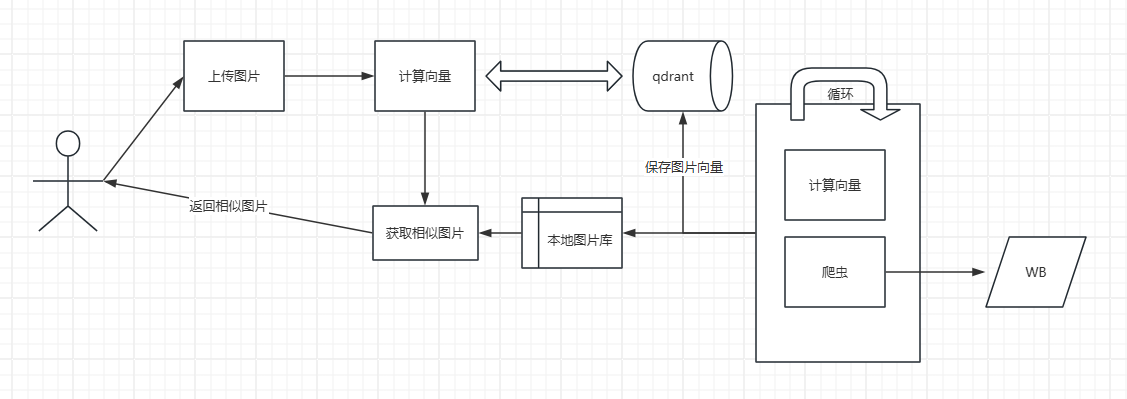
整体思路
爬虫获取图片;
用CLIP获取每个图片向量编码;
把图片的路径和向量编码存入向量数据库;
用户上传图片;
用CLIP获取图片向量编码;
在向量数据库中搜索获取相似图片,并获取图片路径;
返回相似图片;
爬虫 既然是图片搜索,那么我们的第一步就是有一个图片库。这里我直接用python撸了一个简单的爬虫程序,直接从WB爬取图片作为搜索的源。这一步我直接用了scrapy的框架来实现。
请注意,WB可能有反爬虫措施,且抓取用户数据需要遵守相关法律法规和网站的服务条款。脚本仅用于学习和个人使用,抓取公共信息。
这里有个地方需要注意一下,因为现在图片基本上都是动态加载的,所以这里我们还需要用Selenium来获取页面内容。
1
2
3
4
5
6
7
8
9
10
11
12
13
14
15
16
17
18
19
20
21
22
23
24
25
26
27
28
29
30
31
32
33
34
35
36
37
38
39
40
41
42
43
44
45
46
import osimport scrapyfrom selenium import webdriverfrom selenium.webdriver.chrome.service import Servicefrom selenium.webdriver.chrome.options import Optionsfrom scrapy.crawler import CrawlerProcessfrom scrapy.http import Requestimport re class WeiboSpider (scrapy.Spider): name = 'wb' start_urls = ['xxx.xxx.com' ] def __init__ (self, *args, **kwargs ): super (WeiboSpider, self ).__init__(*args, **kwargs) chrome_options = Options() chrome_options.add_argument("--headless" ) chrome_service = Service('D:\\Program Files\\chromedriver\\chromedriver.exe' ) self .driver = webdriver.Chrome(service=chrome_service, options=chrome_options) def parse (self, response ): self .driver.get(response.url) self .driver.implicitly_wait(10 ) images_dir = 'images' if not os.path.exists(images_dir): os.makedirs(images_dir) images = self .driver.find_elements('tag name' , 'img' ) for image in images: image_url = image.get_attribute('src' ) if image_url: yield Request(image_url, callback=self .save_image) self .driver.quit() def save_image (self, response ):
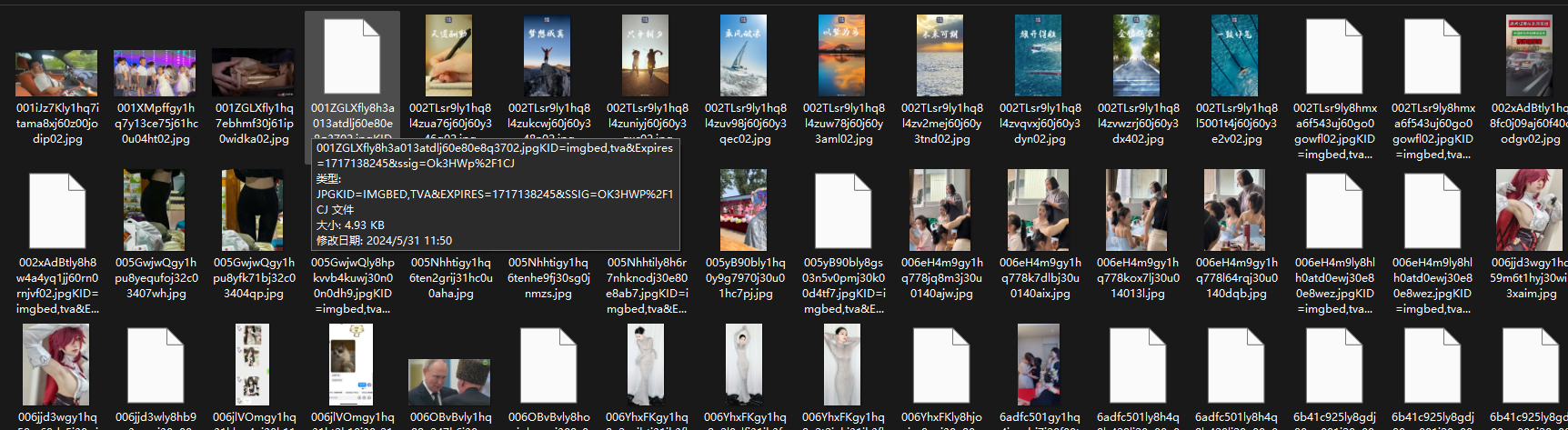
下面是我爬取的图片结果
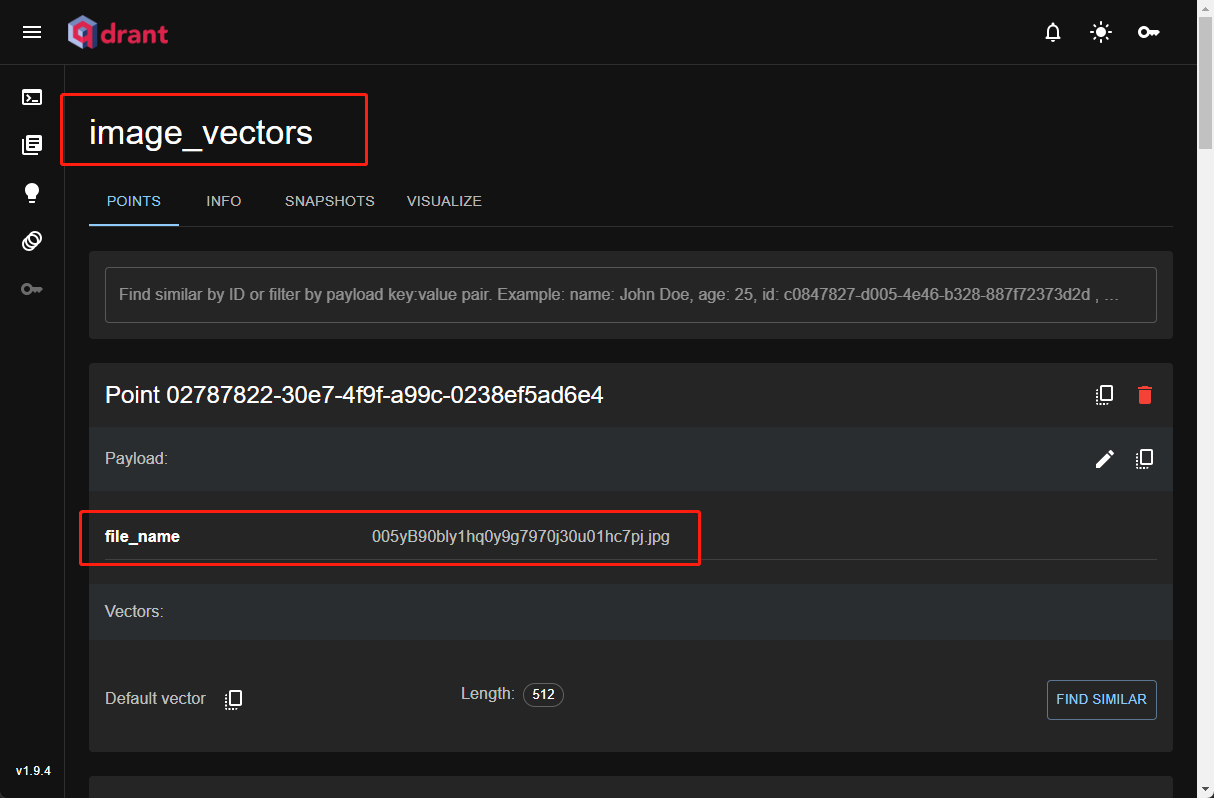
嵌入 这一步可以说是核心步骤了,我们需要将爬取的图片计算向量,保存到向量数据库(qdrant)里面。
我们将使用 OpenAI 的 CLIP 模型,该模型可以将图像和文本转换为相同空间的向量表示。这里我们使用的是 ViT-B/32 变体。《clip》
1 2 3 4 5 6 7 8 9 10 11 12 13 14 15 16 17 18 19 20 21 22 23 24 25 26 27 28 29 30 model = open_clip.create_model('ViT-B-32' , pretrained='openai' ) preprocess = open_clip.image_transform(model.visual.image_size, is_train=False ) qdrant_client = QdrantClient(host='localhost' , port=6333 ) collection_name = 'image_vectors' for image_name in os.listdir(source_folder): image_path = os.path.join(source_folder, image_name) if os.path.isfile(image_path) and image_name.lower().endswith(('png' , 'jpg' , 'jpeg' , 'bmp' , 'gif' )): point = rest.PointStruct( id =point_id, vector=image_features, payload={'file_name' : image_name} )
做完上面这些,基本上我们的准备工作就完成了。我们有了一个图片库,然后为所有的图片计算了向量并且保存到了向量数据库里面。
前端页面 既然说是图片搜索,那么我们就一定需要图片上传的页面。同时根据用户上传的图片再去我们的图片库里面搜索出相似的图片返回给前端。
上传图片;
计算图片向量;
搜索相似图片;
返回相似图片;
为了快速兑现功能,这里我也直接用python实现了一个简单的demo
1
2
3
4
5
6
7
8
9
10
11
12
13
14
15
16
17
18
19
20
21
22
23
24
25
26
27
28
29
30
31
32
33
34
35
36
37
38
39
40
41
42
43
44
45
46
47
48
app = Flask(__name__) UPLOAD_FOLDER = 'uploads' CLIPPED_FOLDER = 'image_scraper/images/clipped' os.makedirs(UPLOAD_FOLDER, exist_ok=True ) model = open_clip.create_model('ViT-B-32' , pretrained='openai' ) preprocess = open_clip.image_transform(model.visual.image_size, is_train=False ) qdrant_client = QdrantClient(host='localhost' , port=6333 ) collection_name = 'image_vectors' @app.route('/' def index (): return render_template('index.html' ) @app.route('/upload' , methods=['POST' ] def upload_file (): if 'file' not in request.files: return "No file part" , 400 file = request.files['file' ] if file.filename == '' : return "No selected file" , 400 if file and allowed_file(file.filename): search_result = qdrant_client.search( collection_name=collection_name, query_vector=image_features, limit=5 ) similar_images = [hit.payload['file_name' ] for hit in search_result] return render_template('result.html' , images=similar_images) return "File not allowed" , 400 if __name__ == '__main__' : app.run(debug=True )
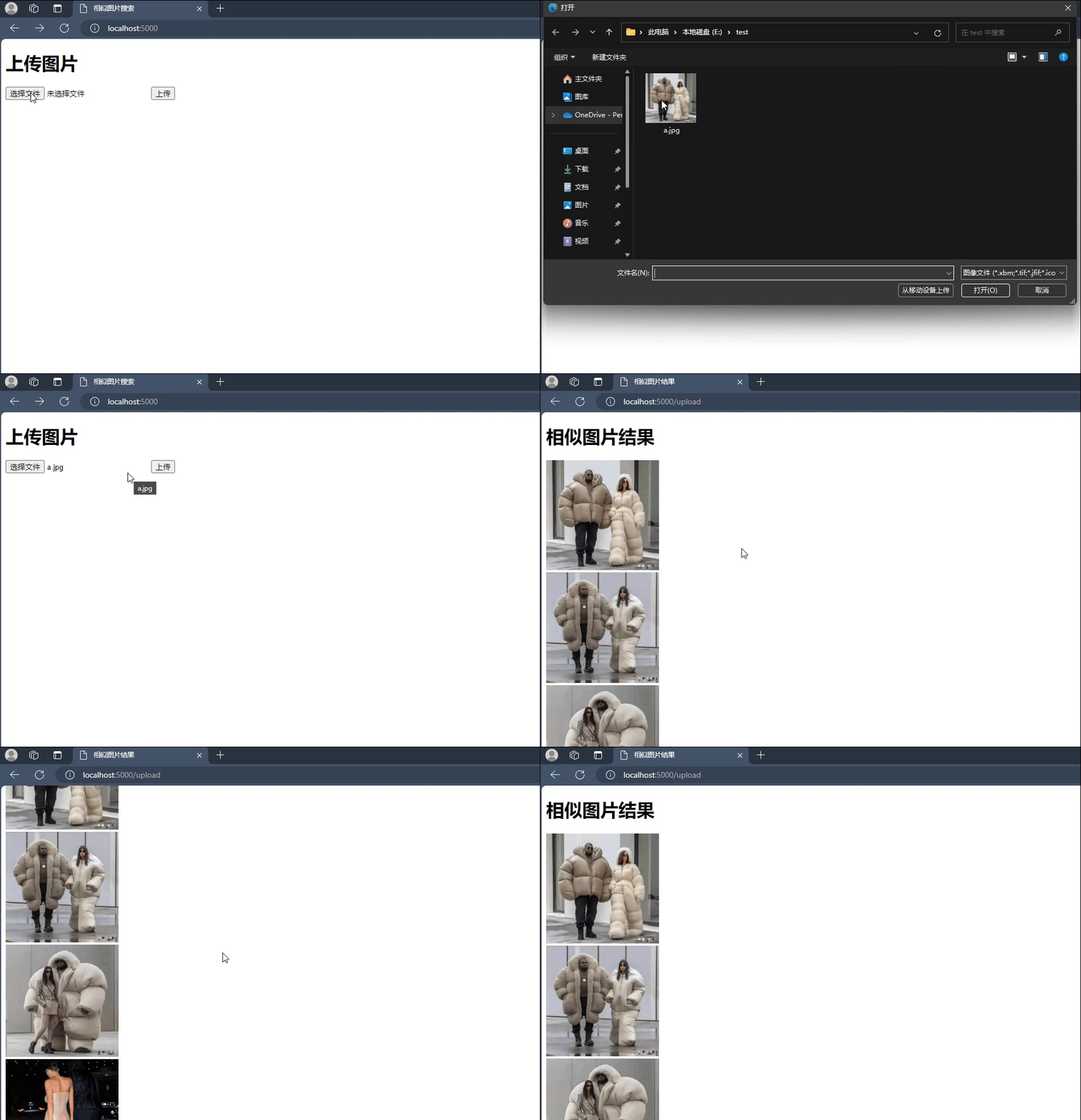
最终的结果,大功告成!
总结 通过上述步骤,我们成功搭建了一个简单的相似图片搜索引擎。这个引擎利用了 OpenAI 的 CLIP 模型来生成图像向量嵌入,并使用 qdrant 来构建高效的向量搜索索引。最后,通过 Flask 搭建了一个 Web 服务接口,使得用户可以上传图片并查找相似图片。
这个项目仅仅是一个开始,你可以根据实际需求进一步优化和扩展。例如,添加更多图片、优化查询速度、增加文本查询功能等。
希望这篇博客能帮助你更好地理解如何从零开始搭建一个相似图片搜索引擎。如果你有任何问题或建议,欢迎在评论区留言讨论。